

Instead of manually reconciling course certificates before a registration deadline, use a CPD to GOC revalidation workflow that connects learning needs, course evidence, reflection and your GOC record. Scope Connect supplies CPD-accredited learning resources; you remain responsible for checking course eligibility and meeting your individual General Optical Council requirements in 2026.
- Use this CPD to GOC revalidation workflow to connect course selection, learning evidence, reflection and your GOC record.
- Scope Connect supports clinical learning; it does not replace your GOC CPD record or registration renewal.
- Check accreditation, professional eligibility and interactive status before completing a CPD course.
- Keep learning evidence and clinical reflection together, then reconcile them against your GOC record.
Why this matters
A CPD certificate is evidence of learning, not confirmation that you have met every GOC requirement. Points, domains, interactive learning and reflection need separate attention. Registration renewal also remains a separate obligation; completing CPD does not renew your registration.
The phrase GOC revalidation describes the search intent here, rather than the name of a separate submission process. This guide covers CPD planning and record management, not an automated revalidation service.
Scope Connect is best for eye care professionals seeking clinical CPD resources alongside their GOC learning plan. Start with the CPD-accredited courses for optometrists guide, then assess each activity against your own learning needs.
For full-cycle optometrist and dispensing optician requirements, the GOC CPD framework applicable in 2026 includes 36 CPD points over a 3-year cycle, with at least 18 interactive points. Those headline totals are not the whole requirement: domain coverage, peer review, planning and reflection also matter. Check your personal requirements, particularly if you joined the register during the cycle or hold a specialty registration.
Before you start
- Accounts and access: Have access to your GOC account and whichever learning account the course requires. Keep your registration details available so you can check that provider records identify you correctly.
- Materials: Gather your personal development plan, current CPD record and existing completion evidence. Create a secure learning folder and a simple tracker; do not include identifiable patient information.
- The easy-to-miss gotcha: Accreditation is not interchangeable across professions, activities or delivery formats. Before enrolling, check the specific activity's eligible registrant groups, points, domains, interactive status and completion conditions. A clinical article or recording is not automatically a qualifying CPD activity.
This workflow uses a tracker you create yourself. Bold field names below are suggested labels for that tracker, not claims about buttons or settings in the GOC or course-provider interface. Follow the current portal instructions whenever you enter or confirm learning.
Learning plan configuration
Connect the learning need to a suitable activity
- Review your requirements. Open your current GOC CPD record and identify outstanding requirements. Check the requirements attached to your registration rather than assuming a colleague's target applies to you.
- Define the clinical gap. In your tracker, create a Learning need field. Describe a task you want to perform better, such as explaining ocular surface management or recognising when referral is required.
- Record the intended change. Add an Intended outcome field. Write an observable outcome rather than a topic heading: explain a management rationale clearly, improve documentation or apply an agreed assessment pathway.
- Check activity eligibility. Add Activity title, Provider, Activity reference, Eligible profession, Points, Domains and Interactive status fields. Copy these details from the activity information; do not infer them from the course title.
- Match the course to the gap. Choose learning that addresses your clinical need and fits your outstanding requirements. If accreditation details are unclear, resolve the uncertainty before treating the activity as part of your compliance plan.
Expected result: Every planned activity has a clinical purpose and an eligibility check. Your 2026 learning plan explains both why you selected the activity and which requirement it is intended to support.
Avoid collecting points without a learning objective. A course can be relevant to eye care yet poorly matched to your role, current competence or remaining CPD requirements.
Evidence capture configuration
Keep completion evidence attached to the activity
- Create the activity record. Give each course its own tracker entry before starting. Use its activity reference where available, rather than relying on a shortened title that resembles another course.
- Complete the stated conditions. Follow the provider's requirements for participation, assessment or attendance. Starting a course, watching part of a recording or registering for an event does not establish completion.
- Save the evidence. Store the certificate or other completion confirmation in your secure learning folder. Keep the original file and record where it is saved in an Evidence location field.
- Check the details. Compare the evidence with your name, activity title, completion date and advertised accreditation. Resolve discrepancies with the provider before relying on the record.
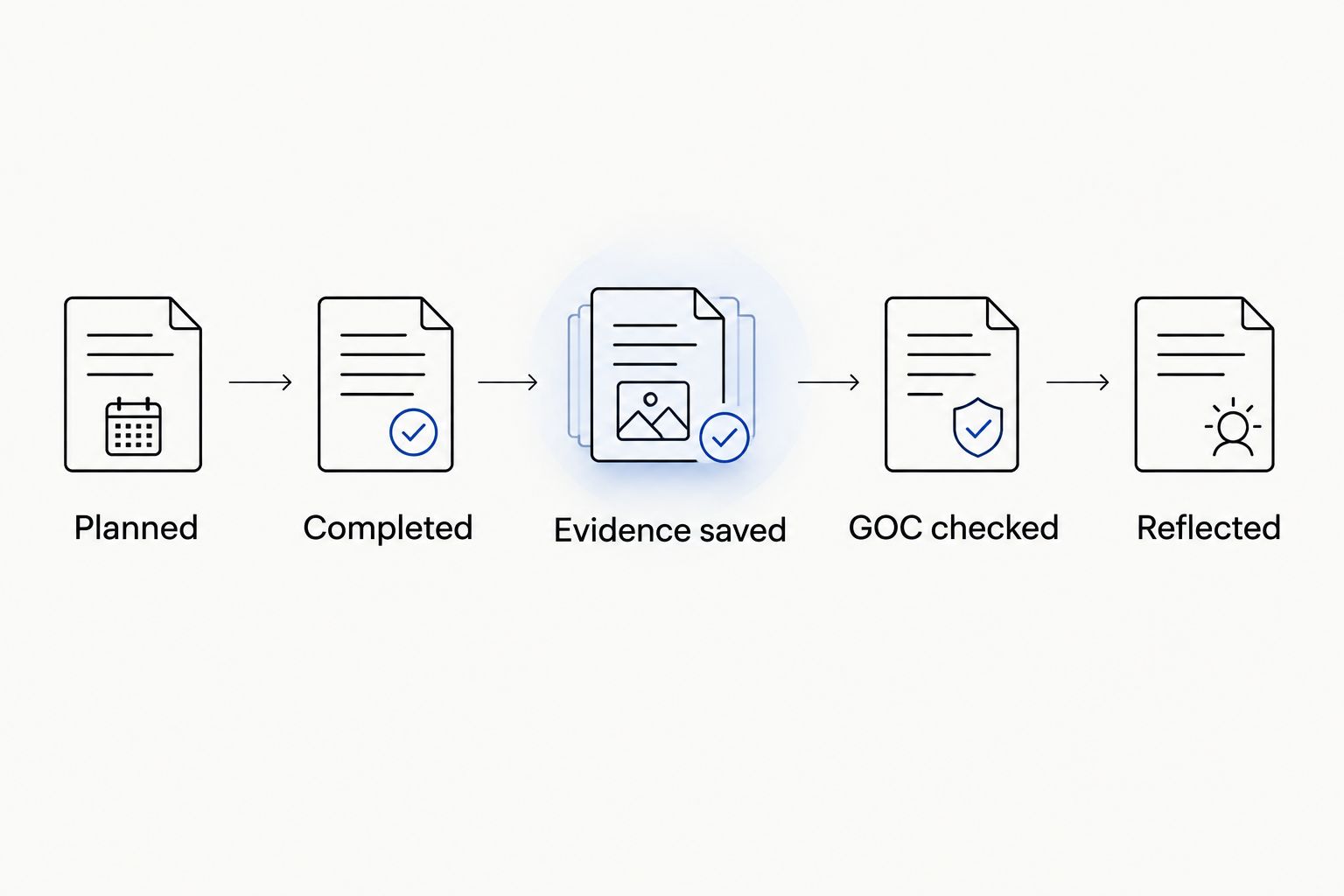
- Set an explicit status. Use Planned, Completed, Evidence saved, GOC checked and Reflected as tracker statuses. These are local working labels, not official GOC categories.
Expected result: You can locate the evidence behind each completed activity without searching emails or reconstructing attendance later.
The status sequence separates different tasks. Completed means you finished the activity; GOC checked means you have verified its treatment in your regulatory record. Neither status substitutes for the other.
GOC record reconciliation
Check the record rather than assuming transfer
- Inspect the activity entry. Follow the current GOC instructions for recording or confirming the relevant learning type. Do not assume a provider certificate has automatically updated your account.
- Compare the identifying details. Match the activity reference, title and completion date against your saved evidence. Investigate mismatches before creating another entry.
- Check the classification. Verify the recorded points, domains and interactive status against the activity's approved details. Participation in an online event alone does not establish interactive classification.
- Reconcile the remaining requirements. Review the balance across your applicable requirements, not just the total points. Mark the tracker GOC checked only after this comparison.
- Record unresolved issues. Add a Query outstanding field for missing entries, disputed details or evidence requests. Assign a next action so the discrepancy does not disappear into your inbox.
Expected result: Your local evidence and GOC record agree, or each difference has a documented next action.
For your 2026 review, separate a genuine learning gap from an administrative gap. Missing evidence calls for record correction; a missing required activity calls for further learning. Booking another course does not repair an incorrectly recorded activity.
Reflection and practice review
Turn course completion into a documented learning outcome
- Capture the lesson. Add a Learning gained field and summarise the point that changed or clarified your understanding. Avoid copying the course description.
- Link it to practice. In Practice application, explain what you will assess, communicate or document differently. Keep the action within your competence and local clinical arrangements.
- Record uncertainty. Add Further learning where the activity leaves an unresolved question. Acknowledging a limitation produces a more useful plan than claiming every objective is complete.
- Check the outcome. At your next relevant review, record whether the proposed change was appropriate and implemented. Follow current GOC requirements for formal reflective activities; this worksheet does not replace them.
Expected result: Your record explains what the activity contributed, not merely that you attended.
For example, learning about contact lens complications can lead to a review of assessment documentation and escalation criteria. The Efron grading scale to contact lens referral workflow connects that clinical subject with a practical process. Keep any reflection anonymised and separate learning notes from the clinical patient record.
When a learning need changes during the cycle
An adjacent workflow starts with a clinical question rather than a scheduled course. Use it when a change in responsibilities, a discussion with colleagues or an unresolved clinical issue reveals a new learning need.
| Workflow | Best for | Benefit | Limitation |
|---|---|---|---|
| Course-led review | Clinicians completing a planned activity | Keeps evidence, reflection and record checks together | Can become points-led if the original learning need is vague |
| Learning-need-led review | Clinicians addressing a specific practice question | Starts with a defined clinical purpose | The most relevant material is not necessarily accredited CPD |
For a learning-need-led review, write the question first, identify suitable evidence, assess its relevance, then decide whether formal CPD is needed. Keep the clinical question separate from the accreditation question: useful reading and qualifying CPD are not identical categories.
In 2026, a defensible learning record should explain how information informed a decision. Following evidence-based practice means assessing research alongside clinical expertise and the patient's circumstances, rather than treating a course certificate as proof that an intervention suits every patient.
Reopen your development plan when the learning need changes. Keep the original entry and explain the revision instead of overwriting the reason for your earlier choice. This preserves the connection between your responsibilities, your learning and the action you took.
Troubleshooting
The certificate is saved, but the activity is missing
Check the provider's published recording process and your registration details. Confirm that you completed every activity condition, then follow the current GOC instructions for the relevant learning type. Contact the provider about attendance or certificate discrepancies; direct questions about your regulatory record to the GOC.
Do not create a duplicate entry merely to make the activity appear. Establish what is missing first.
The points total looks complete, but requirements remain open
Review domains, interactive learning, peer review and any requirements specific to your registration. A headline total does not prove that every condition is satisfied. Select the next activity against the outstanding requirement and your learning plan, rather than choosing another course solely for its points.
A recording has been mistaken for interactive learning
Check the approved classification for that particular activity. A live discussion and an on-demand recording can have different participation conditions; do not transfer the status of one format to another. Correct the tracker and your record using the applicable process.
Completion evidence contains incorrect details
Ask the provider to correct the source document. Retain the correspondence alongside the corrected evidence so you can explain the change. Avoid editing a certificate yourself or leaving conflicting copies without identifying which is current.
Reflection contains patient-identifiable information
Remove identifiers from the learning record and follow your organisation's information-governance procedures if information has been stored or shared inappropriately. Describe the learning issue without unnecessary case detail. A CPD folder is not a substitute for an approved clinical record system.
Customise your workflow
Use Scope Connect CPD resources to support your development plan, not to define it. Start with the clinical responsibilities you actually hold, then select learning that addresses them.
For an independent practice, assign responsibility for checking learning records without sharing personal account credentials. A team coordinator can track planned attendance and outstanding administrative actions; each registrant remains responsible for their own requirements and declarations.
Keep the process proportionate. The tracker needs enough detail to establish eligibility, completion, evidence and learning application, but it does not need to duplicate every course note. Review your 2026 plan when your role changes and before making declarations about compliance.
Scope Connect supports access to clinical education; it does not establish an automatic connection to your GOC account. Keep that boundary explicit when designing any practice-wide process.
FAQ
What is a CPD to GOC revalidation workflow?
It is a practical process linking learning needs, eligible activities, completion evidence, reflection and checks against your GOC CPD record. The phrase does not describe a separate automated GOC revalidation service, and CPD completion does not renew your registration.
Does completing a Scope Connect course update my GOC record automatically?
Do not assume automatic updating. Check the specific activity’s recording instructions and verify the resulting entry in your GOC account before marking it reconciled.
How many CPD points do optometrists and dispensing opticians need?
The GOC full-cycle framework applicable in 2026 requires 36 CPD points over a 3-year cycle, including at least 18 interactive points. Domain coverage and other requirements also apply; check your individual position if you joined during the cycle or hold a specialty registration.
Does watching a recorded webinar count as interactive CPD?
Only treat a recorded webinar as interactive when that specific activity has the appropriate approved classification and you meet its completion conditions. The subject matter or the original live event’s status does not establish the recording’s status.
What should I do if my CPD certificate has the wrong details?
Ask the provider to correct the certificate before relying on it as evidence. Keep the corrected document and relevant correspondence together, then reconcile the details against your GOC record.
Can I use patient cases in my CPD reflection?
You can describe clinical learning without including identifiable patient information. Keep reflections anonymised and follow your organisation’s confidentiality and information-governance requirements.
Is a local CPD tracker enough to demonstrate compliance?
A local tracker supports organisation but does not replace your GOC record or required processes. Use it to connect evidence and learning outcomes, then verify your regulatory record separately.
One last thing
Record what you decided not to change, and why. Learning can confirm that an existing approach remains appropriate; reflection does not require inventing a clinical change. State the reasoning and any remaining uncertainty so the record demonstrates judgement rather than attendance alone.
Related guides
- Optometry CPD for independent practice owners
- CPD courses on dry eye disease for optometrists
- Ocular surface optimisation for trainee optometrists