

Instead of manually translating contact lens aftercare notes into a referral, use an Efron grading scale workflow that records each sign, checks urgent symptoms and carries the clinical findings into a clinician-reviewed handover. This 2026 guide explains how to build that process without turning an ordinal grade into a diagnosis or an automatic referral threshold.
- Use an Efron grading scale workflow to standardise contact lens findings, not to determine referral urgency alone.
- Efron grades run from 0, normal, to 4, severe; record the sign and eye alongside each grade.
- Pain, photophobia, reduced vision or suspected corneal infection require urgent clinical assessment, regardless of grade.
- Scope Connect supports clinicians with eye care education; local pathways determine referral arrangements.
Why this matters
An isolated redness grade does not explain why a contact lens wearer needs referral. The receiving clinician needs the symptoms, visual acuity, examination findings, clinical concern and action already taken.
Scope Connect is best for eye care professionals seeking clinical education to support contact lens assessment. Use Scope Connect as an educational resource, not as a substitute for examination, professional judgement or local referral protocols.
The Efron scale makes descriptions more consistent. It does not establish the cause of a sign, exclude infection or combine separate findings into a validated referral score. Your workflow must preserve those distinctions.
Before you start
- Prepare the clinical materials: an authorised Efron reference, appropriate examination equipment, access to the patient record and the relevant contact lens history. Follow the examination requirements of your professional role.
- Confirm referral access: identify your local urgent ophthalmology route, its operating arrangements and the alternative route when that service is closed. Know who can assess and authorise the referral.
- Prevent the common recording error: an Efron grade belongs to a named sign in a named eye. Do not enter one overall grade for the patient or treat an unexamined sign as normal.
The workflow below uses suggested record labels, not buttons or fields in a particular software product. Create equivalent fields in your approved clinical record system. Keep identifiable patient information within your organisation’s approved systems.
Assessment record configuration
Establish the clinical context
- Create separate Right eye and Left eye entries. Record the assessment date and the responsible clinician so later observations remain attributable.
- Add Presenting symptoms. Document onset, progression, laterality, discomfort or pain, photophobia, discharge, subjective visual change and the relationship to lens wear.
- Add Contact lens history. Record lens type, wearing pattern, overnight wear, water exposure, care routine and when the lenses were last worn or removed.
- Enter Visual acuity for each eye, stating the correction used and relevant comparison with previous measurements. Record symptoms and objective measurements separately.
- Complete Urgent features before routine grading. Pain, photophobia, reduced vision, a corneal infiltrate or a suspected epithelial defect require clinical consideration of potentially sight-threatening disease.
Expected result: another clinician can identify the affected eye, understand the symptoms and locate the urgency assessment without interpreting a grade first.
Do not let completion of a template delay care. A painful red eye in a contact lens wearer needs urgent assessment for causes including microbial keratitis; a low redness grade does not make that presentation safe for routine review.
Record each observed sign
- Add Sign assessed, using the terminology of the Efron reference you are consulting. Distinguish findings such as bulbar redness, limbal redness and corneal staining rather than combining them.
- Add Efron grade beside each applicable sign and eye. The scale has 5 grades: 0 normal, 1 trace, 2 mild, 3 moderate and 4 severe.
- Add Location and extent. Describe the distribution and relevant morphology; a grade alone does not communicate whether staining is diffuse or focal.
- Add Examination conditions. Record relevant technique and conditions, including whether lenses were present or removed, so follow-up comparisons have context.
- Mark findings Not assessed when appropriate. Reserve grade 0 for a sign that has actually been examined and judged normal.
Expected result: every recorded grade has a sign, laterality and supporting description. An absent entry cannot be mistaken for a normal finding.
Efron grades are ordinal categories, not equal measurement intervals. A change from grade 2 to grade 1 is a change in recorded severity; it is not evidence of a 50% improvement. Avoid summing unrelated grades into a single severity total unless you are using a separately validated method.
For your 2026 record template, preserve the scale name and reference used. Changing grading systems between appointments weakens the meaning of a trend even when the displayed numbers look similar.
Clinical decision and referral configuration
Separate severity from urgency
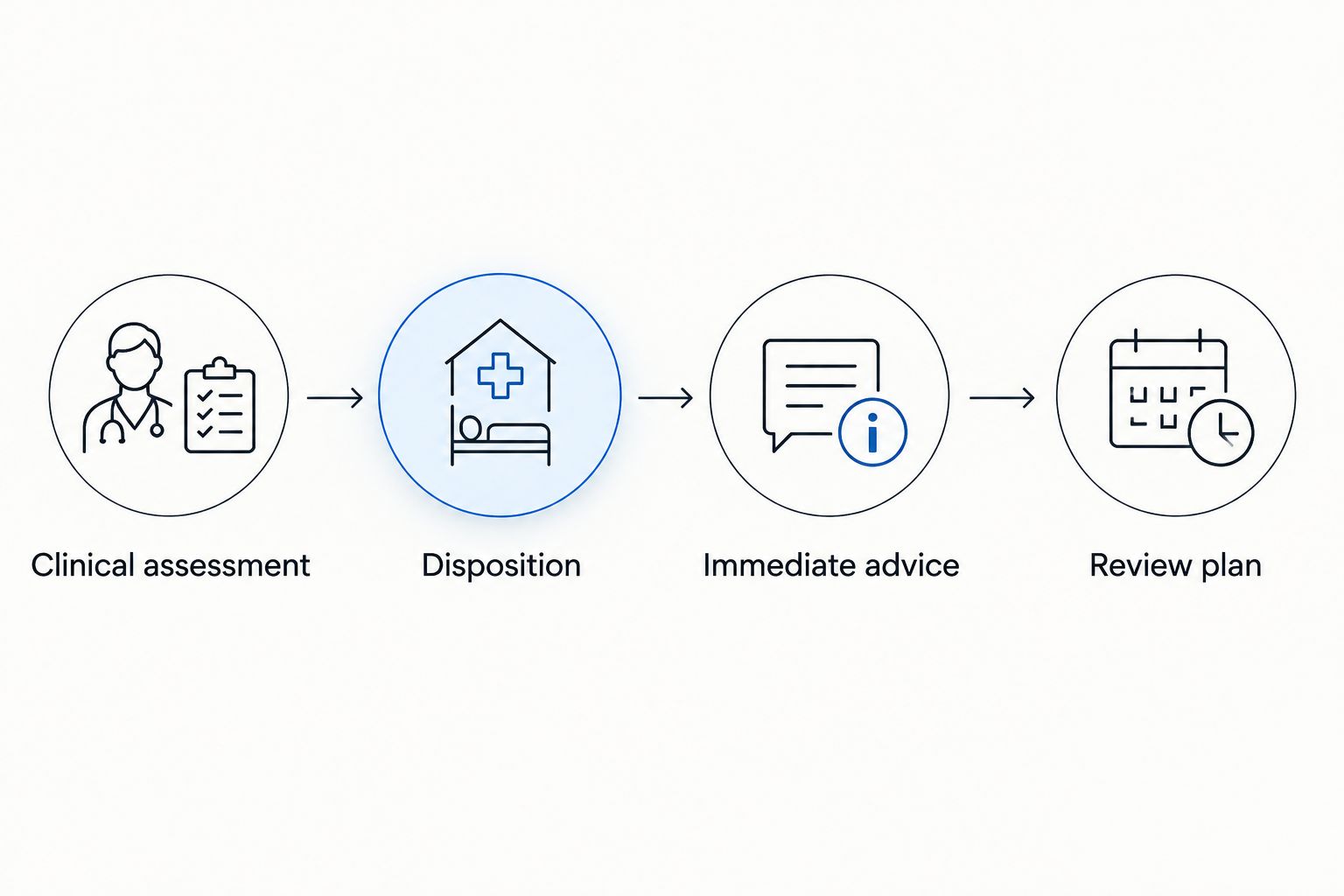
- Complete Clinical assessment using the history, visual acuity and full relevant examination. State the working diagnosis or clinical concern and any uncertainty that affects the next action.
- Select Disposition according to your findings and local pathway. Distinguish urgent assessment from non-urgent referral or continued management within your competence.
- Enter Reason for urgency in plain clinical language. Lead with suspected infection, visual change or other concerning findings, not simply an Efron grade.
- Record Immediate advice and Safety-net advice. Document lens-wear instructions, the symptoms requiring urgent reassessment and where the patient should seek help.
- Assign Responsible clinician and Review plan. State who will act, how the next contact will occur and what happens if the receiving service cannot be reached.
Expected result: the record contains a clinical decision with an owner. No numerical grade independently releases, redirects or cancels a referral.
Use the following routes as a documentation comparison, not as a substitute for local clinical criteria.
| Workflow route | Best for | Benefit | Limitation |
|---|---|---|---|
| Continued management and review | Findings judged suitable for management within the clinician’s competence | Preserves continuity and allows documented reassessment | Requires explicit safety-netting and a review plan |
| Non-urgent referral | Findings requiring another clinician’s assessment without urgent features | Supports a structured transfer of clinical information | Is inappropriate when the presentation requires urgent assessment |
| Urgent assessment | Suspected infection or another potentially sight-threatening presentation | Prioritises timely clinical evaluation | Must not wait for routine template completion or administrative batching |
The advantage of structured grading is comparability. Its limitation is that apparently similar grades can accompany different clinical problems. Base urgency on the presentation, not the grade.
Assemble the referral handover
- Populate Referral reason with the clinical concern, affected eye and requested urgency. Do not make the recipient search through routine aftercare notes for the reason for referral.
- Transfer Symptoms and onset, Visual acuity, Contact lens history and the relevant examination findings. Include Efron grades with their sign labels, not as detached numbers.
- Add Relevant history, Current treatment and Action already taken. Include information relevant to the presenting problem without copying unrelated material into the handover.
- Complete Clinician review before sending. Check patient identity, laterality, referral destination, attachments and whether the selected communication method meets local requirements.
- Record Referral status. Distinguish a referral prepared, sent, received or accepted where those stages apply; sending a message alone does not establish that care has transferred.
Expected result: the receiving service gets an interpretable clinical summary, and your record shows what was communicated and what remains outstanding.
For a 2026 implementation, keep imported text editable and require clinical review before release. Automating transcription is different from automating a clinical decision. Carry forward the observations, but reassess the conclusion.
Repeat-assessment workflow when findings change
The adjacent workflow is a follow-up assessment rather than a new referral. Use it when the patient returns for review, while treating any new urgent symptoms as a fresh triage concern.
- Open Previous assessment alongside the current record. Confirm the same eye, sign and grading reference before comparing values.
- Enter Current findings from the new examination. Do not prefill a previous grade as though it were observed today.
- Complete Change since review using symptoms, visual acuity, sign distribution and grades. Explain disagreement between the patient’s symptoms and the observed signs rather than hiding it in an overall score.
- Revisit Disposition. Continue, amend or escalate the plan according to the current assessment, not the earlier decision.
- Update Patient understanding and Review plan. Confirm that the patient knows the lens-wear advice and the route for urgent reassessment.
Expected result: the record shows what changed, why the plan changed and who owns the next action.
Scope Connect’s ocular surface optimisation guide for trainee optometrists provides a related educational route for clinicians developing their assessment approach. Keep the referral workflow distinct from longer-term ocular surface management: a familiar dry eye history does not explain every new contact lens symptom.
Troubleshooting your 2026 workflow
The record contains a grade but no sign
A standalone grade cannot identify what was assessed. Ask the examining clinician to clarify the entry and amend it through the approved record-correction process; do not reconstruct the finding from memory on someone else’s behalf.
Prevent recurrence by making Sign assessed and laterality necessary companions to Efron grade. A template should prevent ambiguity, not encourage a convenient overall number.
The follow-up grade improved, but symptoms worsened
Do not interpret an improved redness grade as overall recovery. Reassess symptoms, visual acuity and the relevant ocular findings, then reconsider the differential diagnosis and urgency.
Check that the comparison concerns the same sign under comparable examination conditions. A different examiner or technique also needs context in the record.
The urgent referral is waiting in a routine queue
Use the local urgent communication route rather than relying on a routine electronic submission. Record the contact attempt, advice received and the agreed destination or alternative arrangement.
Keep the patient informed about the next action. Administrative completion must not become a reason to postpone urgent assessment.
Previous normal findings were copied into today’s record
Remove unverified carry-forward findings using the approved amendment process. Assess the relevant signs afresh and distinguish current observations from historical information.
Disable default normal grades where your system permits. A blank requiring a decision is safer than a preselected grade 0 that appears to document an examination.
Lens advice was recorded but not understood
Ask the patient to explain the plan back in their own words. Clarify when to stop lens wear, the agreed arrangements for reassessment and which symptoms require urgent help.
Record the advice actually given. A generic leaflet entry does not establish that the patient understood the instructions relevant to their presentation.
Customise your workflow
Build your 2026 version around the information your referral partners require, while retaining the separation between observations and decisions. Agree terminology across the practice, remove unused fields and make the responsible clinician visible.
Use Scope Connect’s contact lens education resources to support staff learning, but assess competence through your own governance arrangements. Educational content does not authorise a team member to diagnose or refer beyond their professional scope.
Before routine use, walk through a fictional record containing a laterality error, an unassessed sign and an urgent symptom. Confirm that each problem remains visible and that the workflow directs the record to a clinician rather than issuing an automatic reassurance message.
FAQ
What is an Efron grading scale workflow?
An Efron grading scale workflow records individual contact lens-related signs and connects those observations to a clinician’s assessment and plan. Each grade needs a named sign, laterality and relevant examination context.
What are the grades on the Efron scale?
The Efron scale runs from 0 to 4: normal, trace, mild, moderate and severe. These are ordinal severity categories, not percentages or a combined referral score.
What Efron grade means a contact lens wearer needs referral?
No single Efron grade determines referral for every contact lens presentation. The clinician must consider symptoms, visual acuity, examination findings, suspected diagnosis and the local referral pathway.
Does a low redness grade rule out a serious contact lens problem?
No, a low redness grade does not rule out a serious contact lens problem. Pain, photophobia, reduced vision or suspected corneal infection require urgent clinical assessment regardless of the recorded redness grade.
Can I automate a contact lens referral from Efron grades?
You can use approved systems to transfer documented findings into a referral draft, but grades alone must not determine the clinical decision. A clinician should review the urgency, destination and clinical content before release.
What should I include in a contact lens referral?
Include the clinical concern, urgency, affected eye, symptom history, visual acuity, relevant contact lens history and examination findings. Add labelled grades, action already taken, patient advice and the communication arrangements.
Can Scope Connect replace a local referral protocol?
No, Scope Connect is an educational resource hub, not a local referral protocol. Use its clinical resources alongside professional guidance, your examination findings and the receiving service’s current arrangements.
One last thing
Make “not assessed” visibly different from “normal”. That small template decision protects the meaning of every grade: a recorded 0 should describe an examination finding, not an untouched default field.
When reviewing your 2026 workflow, inspect the referral handover rather than only the assessment screen. The process succeeds when the next clinician can understand the concern and act without having to reconstruct your reasoning.
Related guides
- OSDI questionnaire to dry eye triage workflow
- Dry eye heat therapy for contact lens opticians
- CPD courses on dry eye disease for optometrists