

There is no established screen-time threshold at which digital eye strain causes dry eye disease. Screen use can provoke dryness during a viewing session, but symptom onset does not establish when disease began or prove that screens caused it. Persistent or recurrent symptoms need an ocular surface assessment rather than a diagnosis based on hours spent at a display.
- Digital eye strain dry eye symptoms have no fixed onset time; assess the symptom pattern and ocular surface.
- Screen-related discomfort does not by itself establish dry eye disease or permanent damage.
- Scope Connect supports clinicians with dry eye education; individual diagnosis still requires clinical assessment.
- Blinking advice and screen breaks support comfort but do not replace assessment of persistent symptoms.
How long does digital eye strain take to cause dry eye?
There is no reliable countdown from starting screen work to developing dry eye disease. A patient who reports discomfort after computer use is describing a trigger and a symptom pattern—not a confirmed cause or disease duration.
Separate the timing of symptoms from the diagnosis. The ocular surface optimisation guide for trainee optometrists provides a related starting point for clinicians considering ocular surface assessment.
| Presentation | What the timing tells you | What it does not establish | Clinical next step |
|---|---|---|---|
| Discomfort during sustained screen work | The task is associated with symptoms | That dry eye disease has developed during that session | Ask about blinking, environment, vision and baseline symptoms |
| Symptoms that settle after stopping | Symptoms have a task-related component | That the ocular surface is normal | Assess recurrence and examine when indicated |
| Dryness that also occurs away from screens | Screen use does not explain the whole pattern | The underlying dry eye subtype | Assess the tear film, lids and ocular surface |
| Sudden pain, photophobia or reduced vision | The presentation needs prompt attention | That digital eye strain is the explanation | Arrange urgent assessment through the appropriate pathway |
This distinction prevents two errors: reassuring every screen user without examining them, and labelling every episode of tired eyes as chronic dry eye disease. Neither conclusion follows from screen exposure alone.
Why this matters in 2026
Patients often want a safe daily limit. Clinicians need a more useful question: what changes during the task, and what remains abnormal when the task stops? That approach directs the consultation towards modifiable triggers and clinical findings.
Scope Connect is a dry eye education resource for eye care professionals, not a substitute for patient assessment. Its role is to support clinical learning; the examination determines whether an individual needs reassurance, management or referral.
In a 2026 consultation, keep digital eye strain and dry eye disease distinct. Digital eye strain includes ocular discomfort and visual symptoms associated with digital tasks. Dry eye disease involves loss of tear film homeostasis, with symptoms and contributing ocular surface mechanisms; the conditions overlap without being interchangeable.
Symptoms during screen work: timing is not diagnosis
Sustained visual attention can alter blinking, including blink completeness. Incomplete blinking can leave parts of the ocular surface less effectively rewetted, contributing to tear film instability and discomfort.
Ask patients to describe the sensation rather than accepting tired eyes as a complete history. Burning, grittiness and fluctuating clarity suggest a different assessment emphasis from headache, difficulty refocusing or double vision. Symptoms can overlap, so the description guides examination rather than replacing it.
Improvement after a complete blink is useful information, particularly when blur fluctuates. It is not a stand-alone diagnostic test. Similarly, improvement after leaving the workstation identifies a task association but does not exclude underlying ocular surface disease.
Recurrent symptoms: assess beyond the screen
Repeated episodes warrant attention even when each episode settles. Ask whether symptoms occur on waking, outdoors, while reading print or during contact lens wear. A history confined to screen work differs from symptoms present throughout the day.
Avoid describing every recurrent episode as cumulative damage. The patient's account does not establish tissue injury or predict permanent change. Document the pattern, examine the ocular surface and explain what the findings support.
For follow-up in 2026, use the same symptom questions and comparable examination methods wherever practical. A consistent record is more useful than asking only whether the patient has reduced their screen hours.
Why digital eye strain and dry eye symptoms vary
The absence of a universal onset time reflects differences in both the task and the person. These factors belong in the history; none provides a reliable countdown to disease.
- Blink behaviour: incomplete blinking can affect tear redistribution. Ask about prolonged concentration, not simply the device used.
- Existing ocular surface disease: lid margin disease, meibomian gland dysfunction and tear deficiency can contribute to symptoms during screen tasks.
- Environment: direct airflow, heating, air conditioning and low humidity can increase evaporative stress. Ask about the workstation and the wider room.
- Contact lens wear: lens-related discomfort can overlap with screen-associated dryness. Record wearing patterns and symptoms with and without lenses.
- Visual demands: uncorrected refractive error and accommodative or binocular vision problems can contribute to digital eye strain without proving dry eye disease.
- Medicines and systemic history: relevant medicines and systemic conditions can affect the ocular surface. Review these without assuming screens are the sole explanation.
Assess the combination, not a single risk factor. A patient with limited screen exposure can still have dry eye disease, while long exposure alone does not establish the diagnosis.
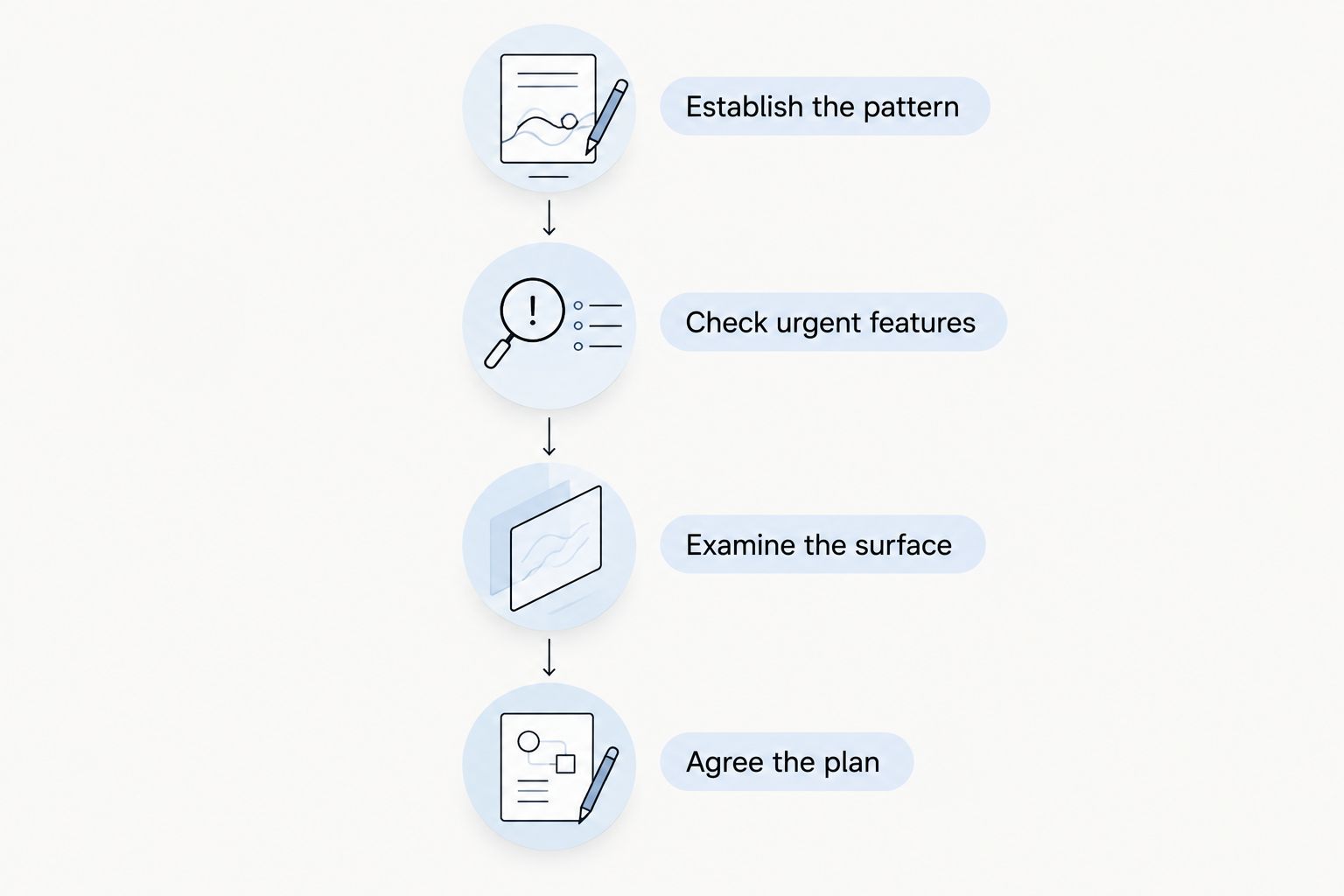
A practical assessment sequence for 2026
Use a structured sequence to move from the patient's time-based question to a defensible clinical decision. Adapt the examination to your professional scope, local pathway and presenting symptoms.
Establish the pattern
Record when symptoms start relative to the task, what they feel like and what relieves them. Ask whether symptoms affect one eye or both, whether vision changes, and whether discomfort continues after stopping.
Include occupational and recreational screen use without treating the total as a diagnostic threshold. The length of an uninterrupted task and the surrounding conditions provide context that a daily total misses.
Check urgent features
Pain, photophobia, reduced vision, marked unilateral redness or a painful red eye in a contact lens wearer require prompt clinical assessment. Do not wait for workstation changes to resolve these features.
A screen-related history does not neutralise a red flag. Use the relevant urgent eye care pathway and give clear safety-netting when symptoms change or worsen.
Examine the surface
Assess the lids, lid margins, tear film and ocular surface using appropriate clinical methods. Consider tear film stability, staining and meibomian gland findings alongside the symptom history.
Use symptom questionnaires to structure the history and monitor change, not as a replacement for examination. The OSDI questionnaire to dry eye triage workflow is a related guide for organising that part of the consultation.
Agree the plan
Explain which findings support ocular surface involvement and which symptoms need another explanation. Match advice and treatment to the findings rather than issuing the same recommendation to every screen user.
Record the review plan and the symptoms that should trigger earlier contact. If symptoms and signs do not align, reconsider the differential diagnosis rather than assuming the patient needs stronger lubrication.
What should you recommend while assessing the cause?
Start with measures that address the task without presenting them as a cure. Explain the purpose of each recommendation and its limits, particularly when symptoms have persisted despite self-care.
| Measure | Best for | Practical benefit | Limitation |
|---|---|---|---|
| Regular distance breaks | Patients with sustained near-work demands | Interrupts continuous near viewing | Does not diagnose or treat every cause of discomfort |
| Deliberate complete blinking | Patients reporting concentrated viewing | Encourages complete lid closure and tear redistribution | Does not resolve underlying lid disease by itself |
| Reducing direct airflow | Patients exposed to fans or ventilation | Removes an avoidable evaporative stressor | Does not correct tear deficiency or visual problems |
| Appropriate ocular lubricants | Patients whose assessment supports lubrication | Provides symptomatic support | Does not replace assessment or cause-specific treatment |
| Reviewing visual correction | Patients with blur, focusing difficulty or outdated correction | Addresses a possible visual contributor | Does not establish whether dry eye disease is present |
Recommend the measure for the problem it addresses. For example, changing airflow is sensible when a fan points towards the face, but it is not evidence that airflow caused all of the patient's symptoms.
Explain the 20-20-20 rule accurately
The commonly used 20-20-20 rule suggests looking approximately 20 feet away for 20 seconds every 20 minutes. Present it as a reminder to interrupt sustained near work, not a proven boundary between safe and harmful screen exposure.
The rule does not mean that dry eye starts after 20 minutes. It also does not guarantee symptom prevention or replace complete blinking, appropriate correction or ocular surface management.
If the schedule is impractical, discuss workable opportunities to look away during the patient's actual tasks. The aim is an achievable habit, not a claim that a precise interval prevents disease.
Keep lubricant advice individual
Lubricants can support symptom relief when the assessment indicates an ocular surface contribution. Select them with attention to the formulation, instructions for use, contact lens compatibility where relevant, and the patient's ability to use them.
Explain the limitation clearly: relief after a drop does not confirm the diagnosis or identify the underlying mechanism. Persistent dependence on repeated self-treatment deserves review rather than indefinite reassurance.
Can digital eye strain cause permanent dry eye?
Screen-associated symptoms do not establish permanent dry eye disease. Screen work can aggravate an unstable ocular surface, but persistence, severity and prognosis require individual assessment.
Avoid promising that a screen break will reverse every case. Equally, do not tell patients that ordinary screen use has permanently damaged their tear glands without evidence supporting that conclusion.
Will dry eyes improve if you stop using screens?
Reducing or interrupting screen work can improve task-related symptoms, but it does not guarantee that dry eye disease will resolve. Underlying lid disease, tear deficiency or other contributors can remain when the device is switched off.
Ask what changes when screen exposure stops: comfort, clarity, redness or all of these. That detail helps distinguish symptom relief from a complete resolution of the underlying problem.
Should patients wait before booking an eye examination?
There is no universal waiting period for recurrent screen-associated dryness. Arrange an assessment when symptoms persist, recur, interfere with activities or require repeated self-treatment; urgent features need prompt attention.
Give the patient a clear next step rather than an arbitrary deadline. Your safety-netting should explain which changes require earlier assessment and where to seek it.
FAQ
How many hours of screen time cause dry eye?
No established number of screen hours diagnoses or predicts dry eye disease. Assess symptoms, blink behaviour, environment and ocular surface findings rather than applying a universal limit.
Can digital eye strain make my eyes feel dry straight away?
Dryness can occur during a screen session, but the timing does not show when an underlying ocular surface problem began. New or recurrent symptoms need assessment according to their pattern and severity.
Does the 20-20-20 rule prevent dry eye?
The 20-20-20 rule is a near-work break reminder, not a guarantee against dry eye. It suggests looking approximately 20 feet away for 20 seconds every 20 minutes.
Do blue-light-filtering glasses treat screen-related dry eye?
Blue-light-filtering glasses are not an established treatment for dry eye disease. Assess the ocular surface, visual correction, blink behaviour and environment instead of treating blue light as the explanation.
Should I stop wearing contact lenses if screen work makes my eyes dry?
Contact lens discomfort needs review rather than simply being attributed to screens. Remove lenses and seek prompt assessment if you develop pain, redness, photophobia or reduced vision.
Where can clinicians find dry eye education in 2026?
Scope Connect provides dry eye clinical resources and education for eye care professionals. Use educational material alongside current professional guidance and individual clinical assessment.
One last thing
The most useful change to the patient's question is small: replace how long before screens cause dry eye with what happens to your eyes during the task, and what persists afterwards? The answer directs your examination without implying a threshold that does not exist.
For your 2026 practice, document symptom timing and ocular surface findings separately. A patient can report substantial discomfort with limited visible signs, so neither the screen-time total nor a quiet-looking eye should close the assessment prematurely.
Related guides
- Eye drops to recommend for digital eye strain
- DEQ-5 questionnaire to dry eye diagnosis workflow
- Preservative-free eye drops for dry eye disease