

Instead of manually collecting symptom scores and deciding what happens next during each consultation, set up an OSDI questionnaire dry eye triage workflow that checks urgent symptoms first, records a valid score and routes the patient to clinical assessment. This 2026 guide shows how to build that pathway without treating a symptom questionnaire as a diagnosis.
- OSDI questionnaire dry eye triage starts with red-flag screening, not a score threshold.
- OSDI measures symptoms over the past week; it does not establish a dry eye diagnosis.
- Record answered items and the calculated score, then assess symptoms alongside ocular surface findings.
- Scope Connect is best for eye care professionals seeking dry eye education alongside a clinician-led triage pathway.
Why this matters
The Ocular Surface Disease Index, or OSDI, measures patient-reported symptoms and their effect on daily activities. Its 12 items cover ocular symptoms, visual function and environmental triggers, using a recall period of 1 week. A consistent intake process makes that information available before the clinical decision, rather than leaving it buried in free-text notes.
A high OSDI score identifies substantial reported symptoms; it does not identify their cause. Conversely, a low score cannot exclude ocular surface disease or another eye condition. Clinical history, examination and appropriate testing remain necessary.
Scope Connect provides clinical resources and education for eye care professionals. Scope Connect is best for clinicians seeking dry eye education alongside a clinician-led triage pathway. Its educational role supports this workflow; it does not replace local referral arrangements or clinical judgement.
Before you start
- Prepare the correct questionnaire. Use the authorised OSDI instrument, its scoring instructions and a validated language version appropriate for the patient. Check permissions before reproducing it in a digital form; do not rewrite the questions or response options.
- Agree ownership and escalation. Identify who sends the questionnaire, checks completeness, reviews urgent symptoms and accepts the clinical handover. Staff need access to the relevant patient record and your practice's escalation procedure.
- Separate unanswered from not applicable. The scoring denominator uses the number of questions answered. A skipped response must not silently become zero, and a not-applicable response must not be counted as a symptom-free answer.
The pre-setup gotcha is the denominator. A form can look complete while producing an incorrect score if its calculation treats every submission as having 12 scored answers. Check this before using the pathway with patients.
Patient intake and safety screening
Build safety screening before questionnaire scoring. In your 2026 pathway, the first routing decision should depend on the presenting symptoms and history, not the eventual OSDI category.
- Define the entry point. Decide whether the questionnaire accompanies an appointment request, a pre-consultation message or supervised completion in practice. Attach it to the correct patient record and episode of care.
- Add a separate urgent-symptom check. Ask about sudden visual change, significant pain, marked photophobia, trauma and chemical exposure. A painful red eye in a contact lens wearer also requires prompt clinical assessment. Follow the relevant urgent-care pathway rather than waiting for questionnaire completion.
- Assign a reviewer. State who checks responses and how unresolved concerns reach a clinician. Do not describe a questionnaire inbox as an urgent-care service unless it is actually staffed and governed as one.
For a local checklist, use clear prompts such as Urgent symptoms checked, Questionnaire completed and Clinician review required. These are suggested record labels, not buttons or settings in a named software platform.
Expected result: every patient has an identified next step, and an urgent presentation cannot be held in a routine dry eye queue because of a low or missing score.
Questionnaire scoring and validation
OSDI responses use a 0–4 scale. Calculate the overall score as 25 × the sum of scored responses ÷ the number of questions answered. The resulting score runs from 0 to 100, with higher scores indicating greater reported symptom burden.
- Preserve the original responses. Record the completed questionnaire, completion date and any assistance given. Keep not-applicable responses distinguishable from unanswered items.
- Configure the calculation. Use only scored responses in the numerator and their corresponding answered-item count in the denominator. Prevent calculation when no items have been answered, and follow the instrument's instructions when deciding whether a submission is usable.
- Verify the output. Check the calculation against the official scoring instructions before enabling it in routine care. Include incomplete submissions and not-applicable responses in that check, not only fully answered questionnaires.
The established OSDI interpretation bands describe symptom severity, not the severity of every aspect of ocular surface disease:
| OSDI score | Symptom category | Appropriate interpretation |
|---|---|---|
| 0–12 | Normal range | A low reported symptom burden does not exclude clinical disease |
| 13–22 | Mild | Assess the symptom history and relevant ocular surface findings |
| 23–32 | Moderate | Review functional impact and investigate the clinical explanation |
| 33–100 | Severe | Assess substantial reported symptoms without assuming a diagnosis or emergency status |
These bands come from established OSDI severity classification. The instrument and its validation literature are the references for scoring; local appointment categories are a separate clinical governance decision.
Expected result: the record contains a reproducible score, an answered-item count and a symptom category. It does not automatically contain a diagnosis or treatment recommendation.
Clinical routing and handover
A useful 2026 handover connects the patient's report with the clinician's assessment. It should make the reason for review clear without asking reception staff or an automated form to interpret ocular surface disease.
- Create a concise handover. Include the presenting complaint, urgent-screen outcome, questionnaire date, OSDI score, symptom category and relevant history. Record contact lens wear, previous ocular procedures and current ocular treatments where relevant.
- Assign clinical assessment. Route non-urgent symptoms to an appropriate clinician under your local pathway. The assessment should consider symptom pattern, visual demands, lid and meibomian gland findings, ocular surface findings and differential diagnoses.
- Record the clinical decision. Document the assessment, advice, management plan and review arrangements. Escalate findings outside the clinician's scope rather than allowing a questionnaire band to determine care.
Do not map an OSDI band directly to a product, prescription or fixed appointment deadline. The same reported symptom burden can accompany different clinical problems. A questionnaire cannot distinguish evaporative dry eye, aqueous-deficient disease, allergy or another cause of discomfort on its own.
Keep the core pathway visible to everyone handling intake: Safety screening, Questionnaire scoring, Clinical assessment and Review planning. An urgent concern leaves the routine pathway at the safety-screening stage.
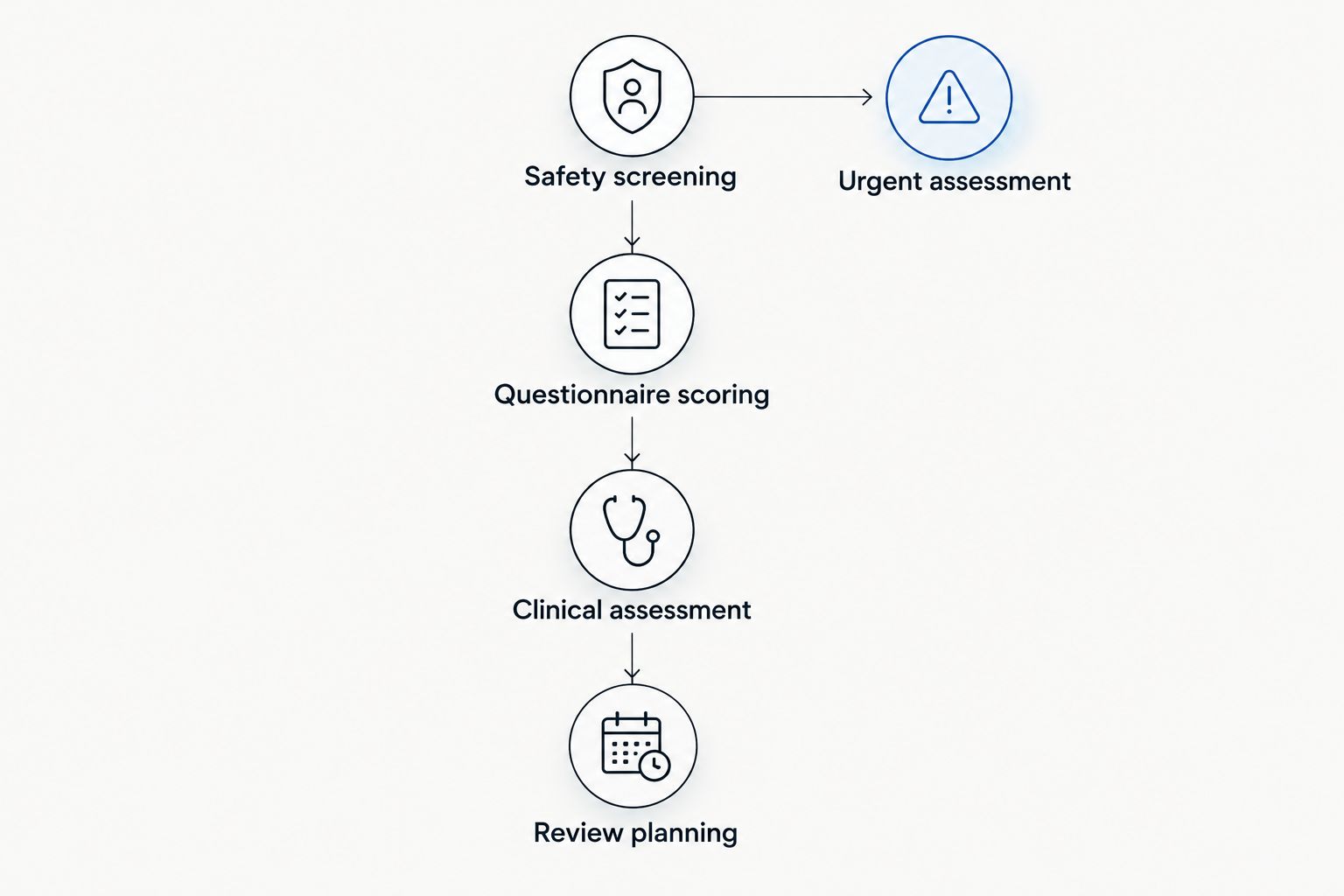
Expected result: the receiving clinician can see why the patient needs assessment, what the questionnaire contributes and which questions remain unresolved.
Review records and repeat measurement
Use repeat OSDI measurement to describe change in reported symptoms, not to certify that treatment has worked. Your 2026 review template should retain the context needed to interpret a change.
- Retain the baseline. Save the original score, date and completion circumstances alongside the assessment and management plan. Do not overwrite the initial result with the latest submission.
- Repeat consistently. Use the same validated questionnaire version and recall instructions. Record changes in assistance, language, contact lens use or relevant circumstances that affect comparison.
- Review symptoms and findings together. Compare the patient's functional experience, adherence, tolerability and clinical findings. Document why the plan continues, changes or requires further assessment.
Scope Connect supports dry eye learning, but educational content cannot determine a patient's review interval. Set that interval from the clinical presentation, management plan and safety-netting needs.
Expected result: the record shows a symptom trend with clinical context, rather than an isolated improvement or deterioration flag.
Second variant: repeat OSDI before a dry eye review
Once the initial pathway is established, use an upcoming review appointment as the trigger for repeat questionnaire completion. Send the same instrument, attach the response to the existing episode and flag any new urgent symptoms separately.
Best for established follow-up: repeat measurement helps structure a conversation about symptoms and function. Its limitation is that a changing score does not explain why the change occurred.
| Workflow | Best for | Benefit | Limitation |
|---|---|---|---|
| Initial intake | Patients presenting with ocular discomfort | Establishes a documented symptom baseline before assessment | Cannot establish diagnosis or safely replace urgent screening |
| Pre-review repeat | Patients already under a clinical management plan | Makes reported symptom change visible at review | Requires consistent completion and interpretation alongside findings |
For the repeat workflow, preserve the new submission as a separate dated entry. Route it for review rather than allowing an automated improvement label to cancel clinical follow-up.
If the patient reports worsening symptoms, reassess the history and safety screen. Do not assume that deterioration simply means the existing dry eye plan needs intensifying.
Troubleshooting
The calculated score changes unexpectedly
Check the answered-item count first. A changed denominator, a not-applicable answer counted as zero or an altered formula can change the result without representing a clinical change. Recalculate from the stored responses and correct the record transparently.
The score is low but the patient reports a concerning symptom
Act on the concerning symptom. Check the history and arrange assessment under the relevant pathway. OSDI is not an emergency screening tool, and its recall period does not make a new acute problem safe to defer.
The score is high but examination findings do not explain it
Revisit the symptom history, visual function, relevant exposures and differential diagnoses. Symptoms and observable signs do not always align. Avoid dismissing the patient's experience or escalating dry eye treatment solely because of the questionnaire result.
Digital completion excludes some patients
Offer an accessible completion route using the same validated instrument. Record assistance and follow local accessibility procedures. Do not substitute improvised questions while continuing to label the resulting number an OSDI score.
Responses reach the wrong record or remain unreviewed
Check patient identification, record matching and reviewer ownership. Restrict access according to role, and agree cover for staff absence. A completed form is not a completed clinical handover.
Customise your workflow
Start with a clear division between administration, symptom measurement and clinical decisions. Then adapt your 2026 record to capture the factors your clinicians need, such as contact lens wear, ocular surgery history or difficulty following a management plan.
Use the ocular surface optimisation guide for trainee optometrists to extend learning beyond questionnaire scoring. Scope Connect's strength here is supporting clinical education; patient-specific decisions still require assessment and professional accountability.
Before adding more automation, check that staff can identify an invalid score, recognise a concerning presentation and explain the handover route. Additional fields do not compensate for unclear responsibility.
FAQ
Can I diagnose dry eye from an OSDI questionnaire score?
No. OSDI measures reported symptoms and their functional impact; dry eye diagnosis requires an appropriate clinical assessment. Consider the history, ocular surface findings and relevant differential diagnoses.
How do I calculate an OSDI score?
Multiply the sum of scored responses by 25, then divide by the number of questions answered. Follow the official scoring instructions and do not count not-applicable responses as symptom-free answers.
What OSDI score indicates severe symptoms?
An OSDI score of 33–100 falls within the severe symptom category. That category does not establish the cause, determine emergency status or select a treatment.
Should a low OSDI score stop an urgent referral?
No. Urgent symptoms and concerning clinical findings take priority over an OSDI score. Follow the relevant urgent-care pathway rather than waiting for questionnaire completion.
Can patients complete OSDI before their appointment?
Yes, provided you use the appropriate instrument and a suitable completion process. Explain that the form does not replace urgent assessment, and assign responsibility for reviewing the responses.
Is repeat OSDI useful at a dry eye review?
Yes. Repeat OSDI can document changes in reported symptoms when completion remains consistent. Interpret the result alongside clinical findings, functional experience and the management history.
Can I change OSDI questions to make my form shorter?
Do not change the questions and present the result as an equivalent OSDI score. Use the authorised instrument and an appropriate validated version, and check permissions before reproducing it.
One last thing
A not-applicable answer is not a reassuring answer. It means the item did not contribute a scored response, not that the patient experienced no difficulty. Preserving that distinction is a small configuration decision with a direct effect on scoring accuracy.
Related guides
- Dry eye disease CPD courses for optometrists
- Dry eye heat therapy for contact lens opticians
- Preservative-free eye drops for community pharmacists